
CastPolish v1.3 — AI Noise Reduction, In-App Installer, and Processing Logs
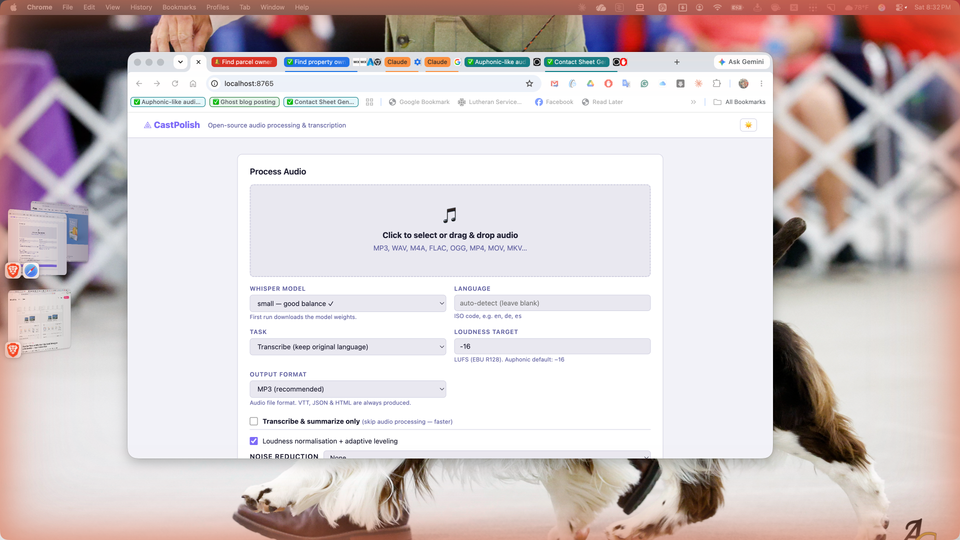
CastPolish v1.3 lands three features that make it meaningfully easier to install, use, and understand what's happening under the hood. Here's what's new.
1. DeepFilterNet AI Noise Reduction
CastPolish now supports three tiers of noise reduction, and each level only appears in the dropdown if its package is installed — so nothing breaks if you skip one.
- Standard (ffmpeg afftdn) — always available, fast FFT-based suppression.
- Dynamic (noisereduce) — spectral subtraction that adapts over time. Good for variable background noise.
- AI Enhanced (DeepFilterNet3) — a neural network trained specifically for speech. Highest quality. Runs ~10–60× realtime on CPU, no GPU required.
DeepFilterNet runs in a completely isolated Python virtual environment at ~/.castpolish/df_venv/ to avoid a numpy version conflict with pyannote.audio. You never see this — it just works. On a real-world 13-minute lavaliere recording, DeepFilterNet finished in 13 seconds.
2. In-App Install & Update Buttons
The Dependencies panel now has Install buttons next to every optional package that isn't yet installed. Click Install next to DeepFilterNet, noisereduce, or pyannote.audio and watch the install log stream live in the UI — no terminal required.
A Check for updates button runs parallel PyPI version checks for all installed packages and shows Update badges with one-click upgrades for anything outdated.
3. install.command — Double-Click Installer for macOS
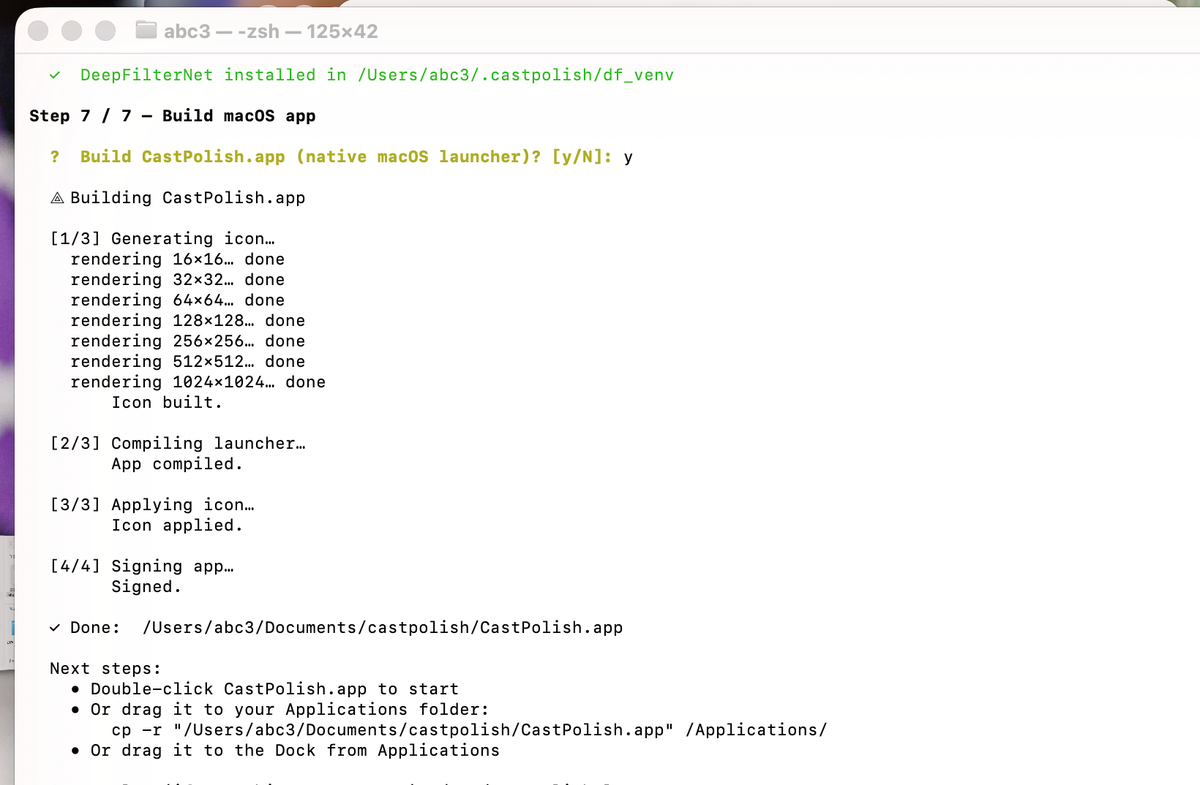
A new install.command file sits in the repo root. Double-click it in Finder and Terminal walks you through a complete guided setup: Homebrew, ffmpeg, Python, core packages, optional features (Whisper, Ollama, pyannote, DeepFilterNet), and building the .app. It's idempotent — run it fresh or use it to update an existing install.
4. Processing Log File
Every completed job now writes a .log file alongside the audio, VTT, JSON, and HTML outputs. It captures the input file, all settings used, every processing step with a [MM:SS] timestamp, loudness before and after, and output file sizes. A Log download link appears in the results table. Here's an excerpt from a real 13-minute sermon recording:
The Installer (macOS)
Double-click install.command in Finder and a guided 7-step Terminal session handles everything: Homebrew, ffmpeg, Python, core packages, optional features (Whisper, Ollama, pyannote.audio, DeepFilterNet), and building the native .app. Idempotent — safe to run fresh or to update.
What a Processing Log Looks Like
Every completed job writes a .log file alongside the outputs. Real log — 13-minute sermon, lavalier mic, AI noise reduction + loudness + Whisper transcription, done in 2 minutes:
══════════════════════════════════════════════════════════════
  CastPolish v1.3.0  —  Processing Log
  Generated : 2026-06-07 15:31:09
══════════════════════════════════════════════════════════════

  INPUT
    File        :  2026-06-07 "After Two Days… Mercy, Not Sacrifice" Sermon Pentecost 2.m4a
    Duration    :  13:44
    Size        :  12.7 MB

  SETTINGS
    Noise mode  :  AI Enhanced (DeepFilterNet3)
    Normalize   :  Yes  →  target -16.0 LUFS (EBU R128)
    Transcribe  :  Yes  (model: small, task: transcribe, language: auto-detect)
    Diarization :  No
    Output fmt  :  MP3

  PROCESSING STEPS
    [00:00]  Processing: 2026-06-07 "After Two Days… Mercy, Not Sacrifice" Sermon Pentecost 2.m4a
    [00:00]  Output dir: ~/CastPolish-output/2026-06-07-After-Two-Days-Mercy-Not-Sacrifice-Sermon-Pentecost-2
    [00:00]  Starting DeepFilterNet3 (loading model…)
    [00:14]    [DF] Running on torch 2.12.0
    [00:14]    [DF] Loading model settings of DeepFilterNet3
    [00:14]    [DF] Using DeepFilterNet3 model at ~/.cache/DeepFilterNet/DeepFilterNet3
    [00:14]    [DF] Initializing model `deepfilternet3`
    [00:14]    [DF] Found checkpoint model_120.ckpt.best (epoch 120)
    [00:14]    [DF] Running on device cpu
    [00:14]    [DF] Model loaded
    [00:14]    [DF] DeepFilterNet3 running on CPU (48 kHz, model sr=48000)
    [00:14]    [DF] DeepFilterNet enhancement complete.
    [00:14]  Measuring loudness (pass 1/2)…
    [00:24]  Applying loudness correction (pass 2/2, -32.3 → -16.0 LUFS)…
    [00:36]  Preparing audio for transcription…
    [00:36]  Loading Whisper model 'small' (faster-whisper)…
    [00:37]  Transcribing…
    [01:52]  Generating chapter titles with Ollama (llama3.2:latest)…
    [01:54]    Chapter 1: The Problem of Human Sinfulness
    [01:54]  Generating shownotes (summaries & tags)…
    [01:54]  Generating long summary…
    [02:02]  Generating brief summary…
    [02:04]  Generating tags…
    [02:05]  Writing output files…
    [02:05]  Done — 240 segments, 1 chapter.

  OUTPUT FILES
    2026-06-07 "After Two Days…" Sermon Pentecost 2.mp3   7.8 MB
    2026-06-07 "After Two Days…" Sermon Pentecost 2.vtt   0.0 MB
    2026-06-07 "After Two Days…" Sermon Pentecost 2.json  0.2 MB
    2026-06-07 "After Two Days…" Sermon Pentecost 2.html  0.1 MB

  Total processing time :  2:05
══════════════════════════════════════════════════════════════
CastPolish is free and open-source
MIT license · macOS full support · Linux & Windows supported
★ View on GitHub ⬇ Download install.commandmacOS: double-click install.command in Finder · Linux/Windows: python3 castpolish.py serve



Comments ()