
Teaching a Laptop to Read in My Own Voice
Prefer to listen? Here is this post read aloud — in the very cloned voice it describes.
There is a particular kind of editing that only your ears can do. You can read a paragraph twenty times on the screen and it looks fine, and then someone reads it aloud and you hear the seam — the clause that doubles back on itself, the sentence that runs a breath too long, the word you have used three times in a row without noticing. For years I have done this by muttering drafts to myself. Lately I have wanted something better: a voice, ideally my own, that would read a chapter back to me while I follow along and mark what my eye had missed.
The obvious answer is ElevenLabs. Their voice cloning is genuinely excellent, and I use it for finished audio. But "read me the whole draft so I can hear it" is a different job from "produce the final recording." Editing by ear means generating hours of speech, throwing most of it away, changing a line, and generating it again. At that volume a cloud service that bills by the character stops being a tool and starts being a meter running in the corner of the room. What I wanted was something local — free to run, private, and mine to break.
So this became a small obsession: could I get an open-source model to read my drafts in a passable version of my own voice, on my own machine, for nothing but electricity? The answer, eventually, was yes. Getting there taught me more about how these systems actually work than I expected.
The promise and the punishment of Chatterbox
The first serious candidate was Chatterbox, an open-source model from Resemble AI released under a permissive license. Out of the box it does "zero-shot" cloning: you hand it fifteen or twenty seconds of your voice and it imitates the timbre without any training. My first attempts resembled me the way a cousin resembles you in a bad photograph — recognizably in the family, but the pitch had drifted up into a tenor that was not mine, and the delivery came out choppy.
The fix, I decided, was to actually fine-tune the model on my own recordings. This is where the adventure began in earnest, and where I learned that "open source" and "works on the first try" are rarely the same sentence. Getting the training to run on Apple Silicon meant a small archaeology of workarounds: pinning an older version of one library because the newest broke another, stubbing out a watermarking step that assumed hardware I did not have, turning off half-precision math that the GPU refused to do, and dialing the batch size down until the whole thing fit in memory. None of this is in a manual. It is in error messages, forum threads, and the particular stubbornness of someone who has decided the machine will do this whether it likes it or not.
The training itself ran on the GPU in my laptop — Apple's Metal backend, doing the matrix arithmetic that a decade ago would have needed a room full of hardware. A single fine-tuning run on roughly forty-five minutes of my speech took about twenty-two to thirty minutes. That sounds fast until you realize I did it again and again, because each run taught me something was wrong.
And something was reliably wrong. The fine-tuned voice sounded like me, and then it would simply stop — cutting off in the middle of a sentence, swallowing the back half of any thought longer than about twenty words. I chased that failure for days before I understood it, and understanding it requires a short detour into how these models think.
Two ways to make a machine talk
Not all text-to-speech is built the same way, and the difference explains almost everything about why one model is placid and another is temperamental.
The older, sturdier approach is phoneme-based. The word phoneme comes from the Greek phōnē, "sound" or "voice," and that is exactly what these systems traffic in. They take your text and first convert it into a string of phonemes — the discrete units of pronunciation — usually by looking each word up in a pronunciation dictionary. "Colver" becomes a fixed little sequence of sounds. That phonetic script then drives the audio. The great virtue of this design is that it is essentially deterministic: the same sentence produces the same pronunciation every time, because you can look the answer up. It is a recitation. The cost is that recitations tend to sound like recitations — even, careful, and hard to bend to a specific human voice.
The newer approach, and the one behind every impressive voice clone you have heard, throws the dictionary away. Instead of phonemes, these models treat speech as a sequence of learned audio tokens — thousands of tiny abstract fragments of sound — and they predict them the way a language model predicts the next word, by sampling from a cloud of probabilities. There is no lookup. Each run is an improvised performance, not a recitation, which is precisely why it can sound so alive and can mimic a particular person. It is also why it is not deterministic: ask for the same sentence twice and you get two subtly different takes, like an actor doing a second read.
That freedom is the whole trick, and it is also the whole danger. A model that is improvising can improvise badly. Mine had been over-trained — drilled so hard on my recordings that it had begun to memorize rather than generalize — and on long sentences it would lose the thread, start repeating itself, and hit an internal panic button that ended the utterance early. The voice was right; the machine underneath it was neurotic. I got it stable in the end, on a version I still keep as a fallback, but "stable after a week of fighting" is not the same as "good."
Pocket TTS, or the relief of something that just works
The model that finally ended the fight came from Kyutai, a French research lab, and it is called Pocket TTS. It is small — about a hundred million parameters — released openly, and built to run on an ordinary CPU rather than demanding the GPU. It clones a voice zero-shot from a short reference clip, the same way Chatterbox promised to, but two things make it different in practice.
The first is temperament. Pocket TTS is a token-based model like the others, so it still performs rather than recites, but it was engineered to stream cleanly through text of any length without the collapse that plagued my fine-tune. It reads a whole chapter and simply does not fall apart. The truncation problem that had cost me days evaporated.
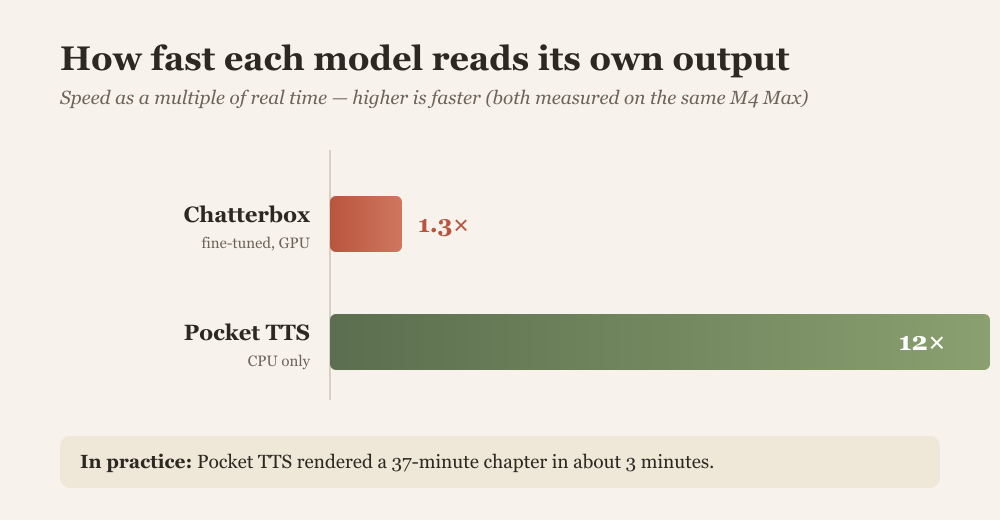
The second is speed, and here the numbers genuinely surprised me. Where my fine-tuned Chatterbox rendered at somewhere between one and one-and-a-half times real time — a thirty-minute chapter taking longer than thirty minutes to produce — Pocket TTS runs at about twelve times real time on the CPU alone. A 37-minute chapter of the family book rendered in three minutes; a 30-minute chapter in under three. It loads in a fraction of a second and imitates my saved voice instantly. After weeks of coaxing a temperamental model through a GPU, the plain little CPU model that just worked felt almost anticlimactic.
I compared them by ear, on the same paragraph, and Pocket TTS won on both counts — it sounded more like me and it produced the whole thing without drama. That settled it.
The last mile: teaching it to breathe
Choosing the model was not quite the end of it. No system reads a book-length text in a single breath; to narrate a whole chapter you break it into pieces, generate each one, and stitch them back together — the same trick the audiobook world has always used. And my first stitching was too eager. It butted each sentence hard against the next with no pause at all, so the model's naturally brisk delivery came out clipped, hurrying from one thought into the following one a half-beat too soon. The words were right; the pacing was wrong.
The fix was unglamorous, and exactly what you would tell a nervous reader at a lectern: slow down and breathe. I gave the seams a real pause between sentences and a longer one between paragraphs, and added the faintest fade at each join so the pieces do not click as they meet. The difference was immediate — the recording stopped sprinting and settled into the cadence of a person reading aloud. There was also the small comedy of the very first heading. I had typed "Chapter 1" in capitals at the top of the file, and the model, improvising from exactly what it saw, read it as "chapter on" — flattening the number into a preposition, rather than saying "chapter one." A reminder that these systems are reading their best guess, not a script, and that a little tuning by ear is still part of the work.
If you want to try it yourself, it lives here:
- Pocket TTS on GitHub: https://github.com/kyutai-labs/pocket-tts
- Kyutai's own write-up: https://kyutai.org/blog/2026-01-13-pocket-tts/
Try it yourself. I put a small live demo on my own homeserver — type a sentence, pick a built-in voice, and hear it read back. (Those are the model’s stock voices, not a clone of me.) voice.collver.biz
Where this goes next
This started as a private convenience — a way to hear my own drafts read back to me — but it has the shape of something more useful. The pipeline now is simple enough to be a product: point it at a text file, a chapter of a book, a sermon, a set of meeting notes, and get back a natural-sounding recording in a chosen voice, all on your own machine with nothing leaving it.
So I am weighing two paths. One is to fold this into CastPolish, the open-source podcast-processing tool I already maintain, as an optional "read this to me" feature. The other is to build a new, small app whose whole job is to take a file in and hand a good recording back. Either way the principle is the same one that started this: keep it local, keep it free to run, and keep the voice yours.
And to prove the point, this post exists as an audio file too — read to you, if you press play, in the very voice I spent all those weeks teaching a laptop to imitate.




Comments ()